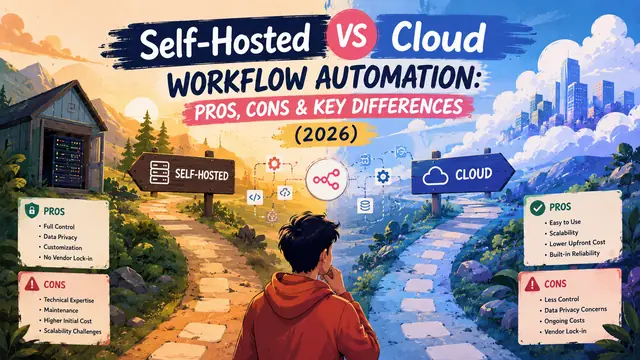
Self-Hosted vs Cloud Workflow Automation: Pros, Cons & Key Differences (2026)
What Is Workflow Automation?
Businesses today rely on workflow automation to eliminate repetitive tasks, connect applications, and streamline operations.
Whether it's automatically processing invoices, synchronizing CRM data, sending notifications, or integrating AI into everyday processes, workflow automation helps teams save time while reducing manual effort.
But once you've decided to automate your workflows, another important question follows.
Should you choose a cloud-based platform or host the automation platform yourself?
The answer depends on your budget, security requirements, technical expertise, and long-term growth plans.
This guide compares both approaches so you can confidently choose the one that best fits your organization.
Self-Hosted vs Cloud Workflow Automation at a Glance
| Infrastructure | Your servers | Vendor-managed |
| Data Ownership | Complete control | Stored on provider infrastructure |
| Setup Time | Moderate | Very fast |
| Monthly Cost | Infrastructure only | Subscription-based |
| Maintenance | Your responsibility | Managed by provider |
| Customization | Extensive | Limited by platform |
| Scalability | Depends on infrastructure | Usually automatic |
| Security Control | Complete | Shared responsibility |
While both options automate workflows effectively, the experience of managing them is very different.
What Is Self-Hosted Workflow Automation?
Self-hosted workflow automation means installing the automation platform on infrastructure that you own or control.
This could be:
- A dedicated server
- A virtual private server (VPS)
- An on-premise machine
- A private cloud
- Kubernetes clusters
- Docker containers
Your organization manages updates, security, backups, monitoring, and scaling.
The biggest advantage is ownership. You decide where your data lives, how the platform is configured, and what integrations are available.
What Is Cloud Workflow Automation?
Cloud workflow automation is delivered as a managed service.
Instead of installing software yourself, you simply create an account and start building workflows.
The provider manages:
- Infrastructure
- Updates
- Security patches
- High availability
- Scaling
- Backups
This allows businesses to focus on building workflows instead of maintaining servers.
Key Differences Between Self-Hosted and Cloud Workflow Automation
Data Privacy
This is often the deciding factor.
With self-hosting, sensitive business information remains within your own infrastructure.
This makes it easier to meet internal security policies and industry compliance requirements.
Cloud platforms also invest heavily in security, but your data is stored and processed on infrastructure managed by a third party.
Cost
Cloud platforms usually have lower upfront costs.
You pay a subscription and can begin immediately.
However, as automation usage grows, monthly costs may increase due to execution limits, premium features, or additional users.
Self-hosting requires infrastructure and maintenance, but recurring platform fees are often lower, especially for businesses running large volumes of workflows.
Setup and Maintenance
Cloud solutions are designed for convenience.
Most users can begin building workflows within minutes.
Self-hosting requires:
- Server provisioning
- Database configuration
- SSL certificates
- Reverse proxies
- Monitoring
- Regular software updates
While these tasks add complexity, they also provide greater control.
Customization
Cloud platforms generally limit access to the underlying infrastructure.
Self-hosted deployments allow organizations to:
- Install custom nodes
- Create internal integrations
- Modify configurations
- Connect private services
- Extend platform functionality
This flexibility is particularly valuable for businesses with unique operational requirements.
Scalability
Cloud services typically scale automatically.
As workflow execution increases, the provider allocates additional resources behind the scenes.
Self-hosted environments require planning.
Organizations may need to upgrade servers, optimize databases, or deploy additional instances to handle increasing workloads.
Although this requires more effort, it also provides complete control over resource allocation.
Reliability
Cloud providers often operate highly redundant infrastructure with built-in failover mechanisms.
For self-hosted deployments, reliability depends on your own infrastructure and operational practices.
With proper monitoring, backups, and high-availability configurations, self-hosted systems can achieve excellent uptime.
Pros and Cons of Self-Hosted Workflow Automation
Advantages
- Complete ownership of your infrastructure
- Greater control over sensitive business data
- Lower long-term costs for high-volume workflows
- Extensive customization options
- Support for private APIs and internal systems
- No platform execution limits imposed by vendors
Disadvantages
- Higher initial setup effort
- Ongoing maintenance responsibilities
- Requires technical expertise
- Infrastructure costs are your responsibility
- Security must be managed internally
Pros and Cons of Cloud Workflow Automation
Advantages
- Fast deployment
- Minimal technical knowledge required
- Automatic updates
- Managed infrastructure
- Easy scalability
- Predictable onboarding experience
Disadvantages
- Subscription costs can increase over time
- Less flexibility for custom implementations
- Vendor limitations on workflows and executions
- Less control over infrastructure
- Data resides on third-party servers
Which Option Is Right for Your Business?
There's no universal answer.
The right choice depends on your priorities.
Choose Self-Hosted Workflow Automation if you:
- Handle sensitive customer data
- Require complete infrastructure control
- Need custom integrations
- Run a large number of workflow executions
- Have technical resources available
- Want to reduce recurring platform costs over time
Choose Cloud Workflow Automation if you:
- Need to launch quickly
- Prefer managed infrastructure
- Have a small team
- Don't want to manage servers
- Run a relatively small number of workflows
- Prioritize convenience over customization
Real-World Scenarios
Startup
A small startup wants to automate marketing and CRM tasks without hiring an infrastructure engineer.
A cloud platform is often the fastest way to begin.
Digital Agency
An agency manages automation for dozens of clients.
A self-hosted deployment can reduce recurring costs while providing greater flexibility across client projects.
Enterprise
A financial institution processes confidential customer information.
Strict compliance requirements often make self-hosted automation the preferred choice.
AI-Driven Business
A company building AI-powered workflows with local language models wants complete control over data processing.
Self-hosting enables private AI automation without exposing sensitive information to external platforms.
Frequently Asked Questions
Is self-hosted workflow automation more secure?
It can be, provided your infrastructure is configured correctly with proper authentication, encryption, monitoring, and regular security updates.
Is cloud workflow automation cheaper?
Initially, yes.
For smaller teams, cloud subscriptions are often the most affordable option. As workflow volume grows, self-hosting may become more cost-effective.
Which option scales better?
Cloud platforms generally scale faster with less operational effort.
Self-hosted deployments offer greater flexibility but require infrastructure planning.
Can I switch from cloud to self-hosted later?
Yes.
Many automation platforms support migration, allowing organizations to move workflows as their operational needs evolve.
Which option is best for AI workflow automation?
Businesses working with sensitive data, local AI models, or enterprise-scale automation often benefit from self-hosting. Smaller teams seeking rapid deployment may prefer managed cloud platforms.
Conclusion
Choosing between self-hosted and cloud workflow automation isn't about finding the objectively better option. It's about selecting the approach that aligns with your organization's goals, technical capabilities, and growth strategy.
Cloud platforms offer speed, simplicity, and convenience, making them ideal for startups and teams that want to focus entirely on building workflows.
Self-hosted workflow automation, on the other hand, provides unmatched control, customization, and long-term scalability. For businesses handling sensitive data, running high-volume automations, or integrating advanced AI workflows, the additional operational effort is often well worth the investment.
As workflow automation continues to evolve, understanding these trade-offs will help you build a platform that supports your business not just today, but for years to come.
Ready to Transform Your Marketing, Branding & Advertising Strategy?
Marketing - marketing strategies that drive real connections and lasting impact.
Advertisement - bold ideas and unforgettable campaigns powered by intelligent automation.
Ad Tech - data-driven power for every campaign with advanced tracking and optimization.
Branding - your story, instantly distinct and emotionally true through enhanced creativity.
Aashish Kumar
AI Automation Expert